Languagers
Languu
AI translation and captioning suite
Five powerful language tools, from live AI interpretation to closed captions, redesigned to feel like one simple product.
- Role
- Principal designer
- Focus
- Product design, Web app, Responsive
The problem
Five powerful language tools that felt like five different products, and a brief full of good ideas arriving all at once
What I did
Designed one system for every tool, page, and state, for both clients and linguists, then handed it to the developer
What changed
Launched on schedule, and the client called it one of the most beautiful websites she'd ever seen
My part
- Ran the engagement end to end with the client
- Turned a marked-up brief into a sitemap and a shared structure
- Designed all five tools and every in-between state
- Led the handoff session with the developer
Who I worked with
- The client
- One developer, at handoff
- A freelance contributor I managed
01 · Why it matters
When words matter most, close enough isn’t
Languu helps people talk across 100+ languages in the places where getting it wrong costs something: hospitals, courtrooms, classrooms, government offices. A patient hearing a diagnosis. A family following a hearing. Behind every translation is someone who needs to understand, and someone who needs to be understood.
The product already had the power. It didn’t have the clarity.
02 · The starting point
It started with red ink
The brief arrived as the client’s own website, covered in notes. New tools to add. New sections to build. Compliance badges to move front and center. Every note was a good idea. All together, they were a lot.

The goals
- Make five tools feel like one productTranslate, Transcribe, AI Interpretation, Text to Speech, and Captioning should share one way of working.Learn one tool and the other four feel familiar on day one.
- Put the words firstPeople come to translate, not to manage settings.Your text takes center stage. Languages and options step back until you need them.
- Earn trust before the first clickHealthcare and legal buyers need proof their data is safe.HIPAA, CJIS, and SOC 2 credentials visible on every tool, not buried in a footer.
- Serve clients and linguistsTwo very different jobs, one platform.One question at sign-in routes each person to the experience built for them.
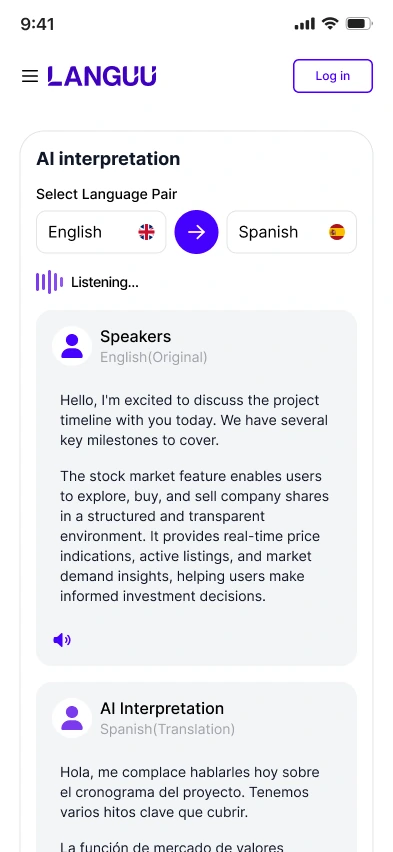
- Work anywhereInterpreters are rarely at a desk.Every tool designed for the phone, not just squeezed onto it.
Plan the house before picking the paint
Before any polish, every page got a blueprint. Eleven page types, from the five tools to pricing, a blog, and separate doors for clients and linguists, all built on the same skeleton: header, workspace, guidance rail, footer.

03 · The core screen
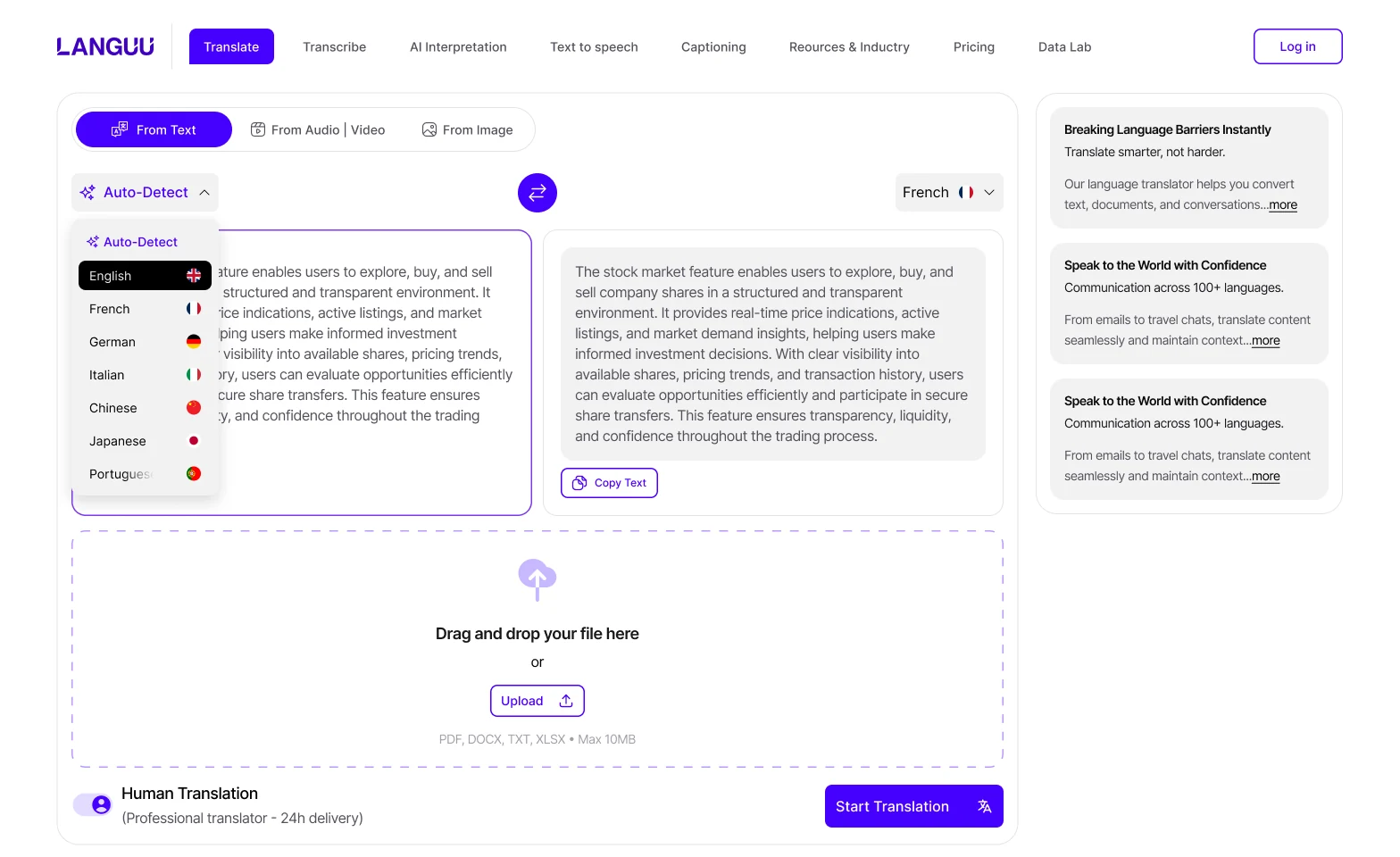
Translation is one sentence: from this, to that
So the translate screen got the most attention, by far. It went through more than ten rounds behind the scenes, so the client never had to sit through them. Here are three.


Every round took something away. What's left is what matters: your words, and the language you need them in
04 · The system
Learn it once, use it everywhere
Every tool shares the same rhythm: pick your languages, add your content, get your result. Anyone who’s used Translate can walk into Captioning and already know their way around.


05 · The details
The quiet moments count too
Nobody screenshots a loading spinner. But waiting, failing, and starting from zero are where trust is won or lost. Each moment got the same care as the happy path: plain words and a clear next step.


Two people, two front doors
Clients book linguists. Linguists take the jobs. One question at sign-in sends each person to the experience built for them.

Fits in a pocket
Interpreters work in hallways. Clients check in between meetings. Every tool works just as well on a phone.


Trust, up front
The brief asked for it, and it was right. For a hospital or a court, security isn’t a feature. It’s the deal. So the compliance credentials sit right under every tool, where buyers look first.

06 · The result
Live, and loved
Ninety days after the first conversation, Languu launched with the new design, and it’s live today. Every tool, every in-between state, sign-in for both audiences, pricing, and a blog, delivered as one production-ready system, with a freelance contributor managed and scope changes absorbed along the way.
First conversation to live site
90 daysBrief, design, build support, and launch
5 tools11 page typesEvery state2 audiencesPricing and blog
The client came to us for something modern, clean, and design-forward. What she got worked the way she pictured it, without rounds of back-and-forth to get there.
One of the most beautiful websites I've ever seen.
Her words, not ours. What she loved most: it’s clean, polished, and easy to understand. Which, for a product that exists to help people understand each other, is exactly the point.


